Automated reminders
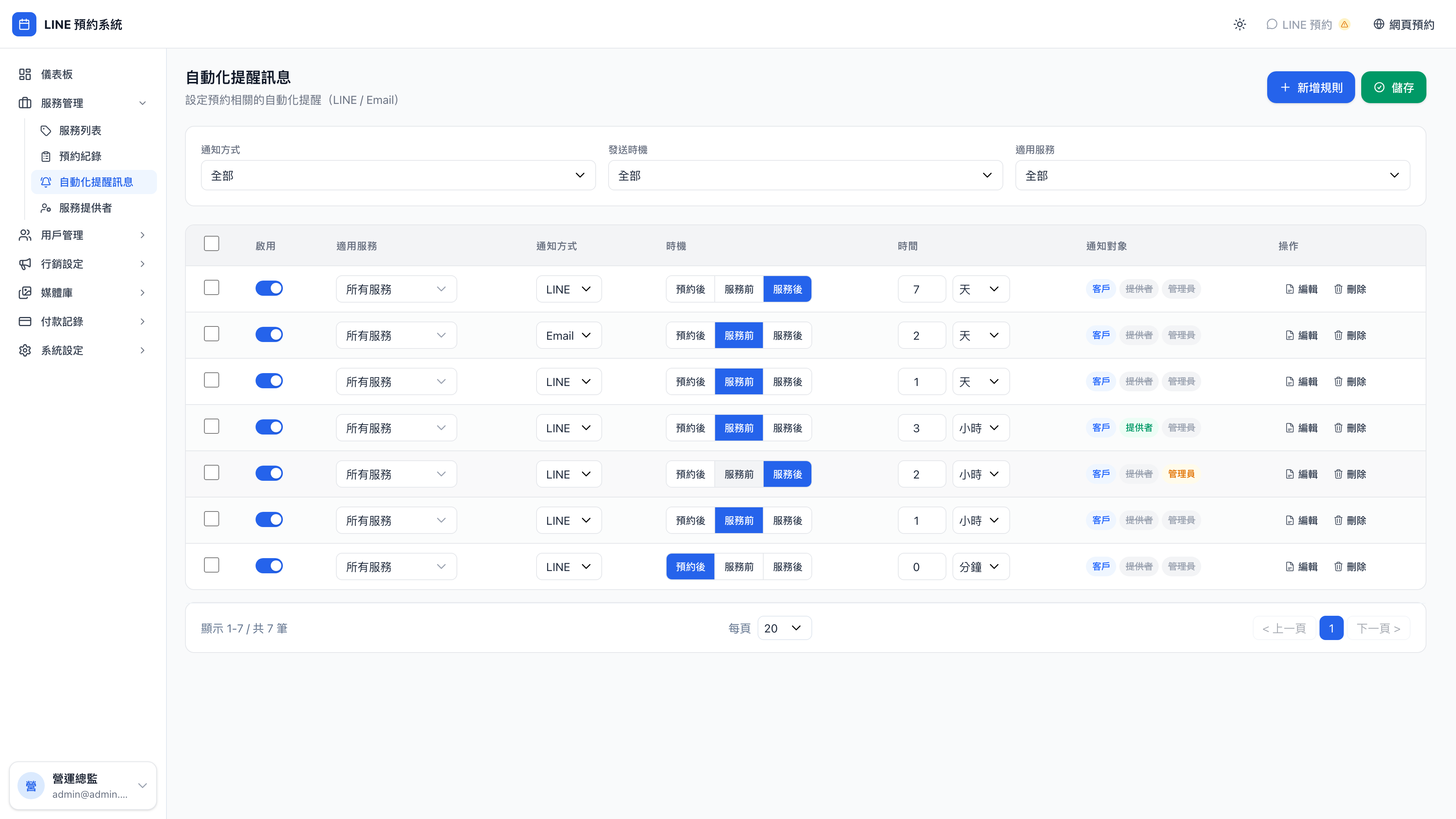
For every booking, the system automatically sends LINE and email reminders before and after the appointment. This page is where those rules are configured.
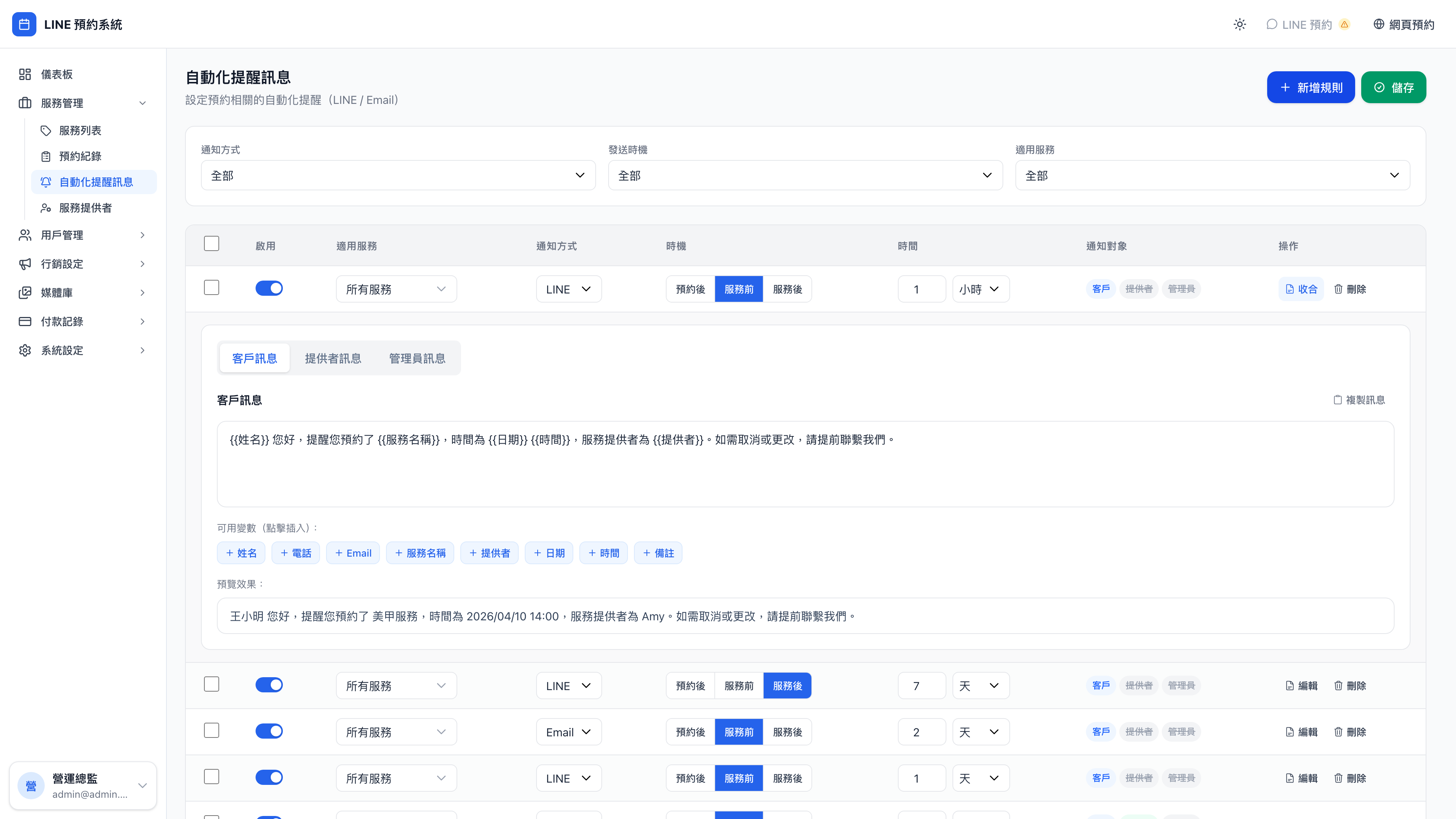
Opening a rule shows its full settings and message templates:
The new rule form:
Why automate reminders?
The core goal is reducing no-shows. Across industries, clients who receive no reminder after booking have no-show rates of 15–25%; with reminders, that drops below 5%. For high-value services or scarce slots (consulting, counseling, legal, aesthetics), the cost of a no-show is higher still — one missed appointment can equal months of profit.
Use case: "I forgot" is the most common reason clients slip away
Ms. Lin booked "business model review, Saturday 14:00" over LINE last Tuesday, certain she wouldn't forget. Then Saturday morning brought a string of errands — dropping the children at a class, the market, lunch with a friend that ran long — and 14:00 came and went.
Had she received a LINE reminder at 8pm the evening before — "you have a business model review at 14:00 tomorrow" — she'd have kept the time clear. One message saves one booking.
The same story plays out everywhere:
- Dentists: a day-before reminder avoids around 20% of no-shows
- Tutors: parents reminded a day ahead don't take the family out that day
- Yoga classes: the teacher confirms students are coming, so the slot isn't wasted
Three trigger timings
| Timing | When it sends | Typical use |
|---|---|---|
| After booking | Immediately after the client books | The "booking confirmed" message |
| Before the service | X minutes / hours / days before the start | A day ahead, an hour ahead |
| After the service | X minutes / hours / days after it ends | Thank-you messages, repeat-booking prompts |
Creating a rule
New rule opens a form asking for:
- Trigger timing (one of the three above)
- When (1 day before, 60 minutes before, immediately, 30 minutes after)
- Channel (LINE or email)
- Limit to a service (blank = every service; pick one = business model reviews only)
- Recipients:
- ☑️ Client
- ☑️ Provider
- ☑️ Admins
- Message content, where you can use variables:
{{姓名}},{{服務名稱}},{{日期}},{{時間}},{{提供者}}
Question: If I tick several recipients, how many messages go out?
One per recipient. Ticking client, provider and admin sends three LINE messages: one to the client, one to the relevant provider, and one to every admin.
The three recipients can have different message templates — the rule settings have separate fields for the client, provider and admin messages.
Common practice:
- To the client: "You have a consultation tomorrow at 14:00 — looking forward to it ✨"
- To the provider: "Ms. Lin's business model review is at 14:00 tomorrow"
- To admins: leave blank (no notification), to avoid message fatigue
The demo business's default rules
Mingjing Strategy comes with three rules enabled, visible as soon as you sign in, to reference or edit:
| # | Timing | Recipient | The gist |
|---|---|---|---|
| 1 | Immediately after booking | Client | Confirmation plus a preparation checklist |
| 2 | 1 day before | Client | Suggests writing down discussion topics and two risks they're worried about |
| 3 | 1 hour before | Client | A final reminder plus the online or in-person details |
Use case: adding a repeat-booking prompt
Those three are the basics, but you can add a fourth: "30 days after the service → client → LINE → 'Hello {{姓名}}, it's been exactly a month since your {{服務名稱}} — shall we check in on how the action items are going?'"
This kind of prompt matters especially in consulting: the biggest risk after a session is that the client goes away, means to act, and then forgets. A gentle nudge after 30 days often produces a quarterly review booking.
Repeat prompts elsewhere:
- Aesthetics: six weeks after a laser treatment, "it's time for the next one"
- Traditional medicine: two weeks after a course, "this week we start the second stage"
- English tutoring: a week after term ends, "shall we carry on next term?"
Do repeat triggers send duplicates?
No. The system records the reminder history of every booking, so one booking plus one rule sends once.
Question: If the client reschedules, are already-sent reminders sent again?
They're recalculated:
- If the new time is still in the future, the "1 day before" rule recalculates its send time and sends then
- If the new time has already passed (moving from tomorrow to 10:00 today, which has gone), the rule doesn't send
Enabling and disabling rules
Each rule has a toggle on the right. A disabled rule stops firing, though messages already sent aren't recalled.
Use case: pausing a reminder to test its effect
An owner wants to test what happens with one fewer reminder. Disable the "1 hour before" rule for a month and compare that month's no-show rate against the previous one.
Disabling beats deleting — turn it back on later and the message template is still there.
Note: LINE notifications require a connected Official Account
Every rule on the LINE channel depends on the business's LINE Official Account being connected correctly. If the LINE Channel Token under system settings isn't filled in properly, these rules will be scheduled but fail to send.
If clients report not receiving LINE reminders, check the LINE configuration in system settings first; then check whether that client is actually a friend of your Official Account (if they blocked you, LINE messages can't be delivered either).