Dashboard
The page that opens by default when you sign in. The design principle behind it: you shouldn't have to click into a page to find out how busy today is. The most important figures are gathered in one place, so three seconds after opening the admin you know where things stand.
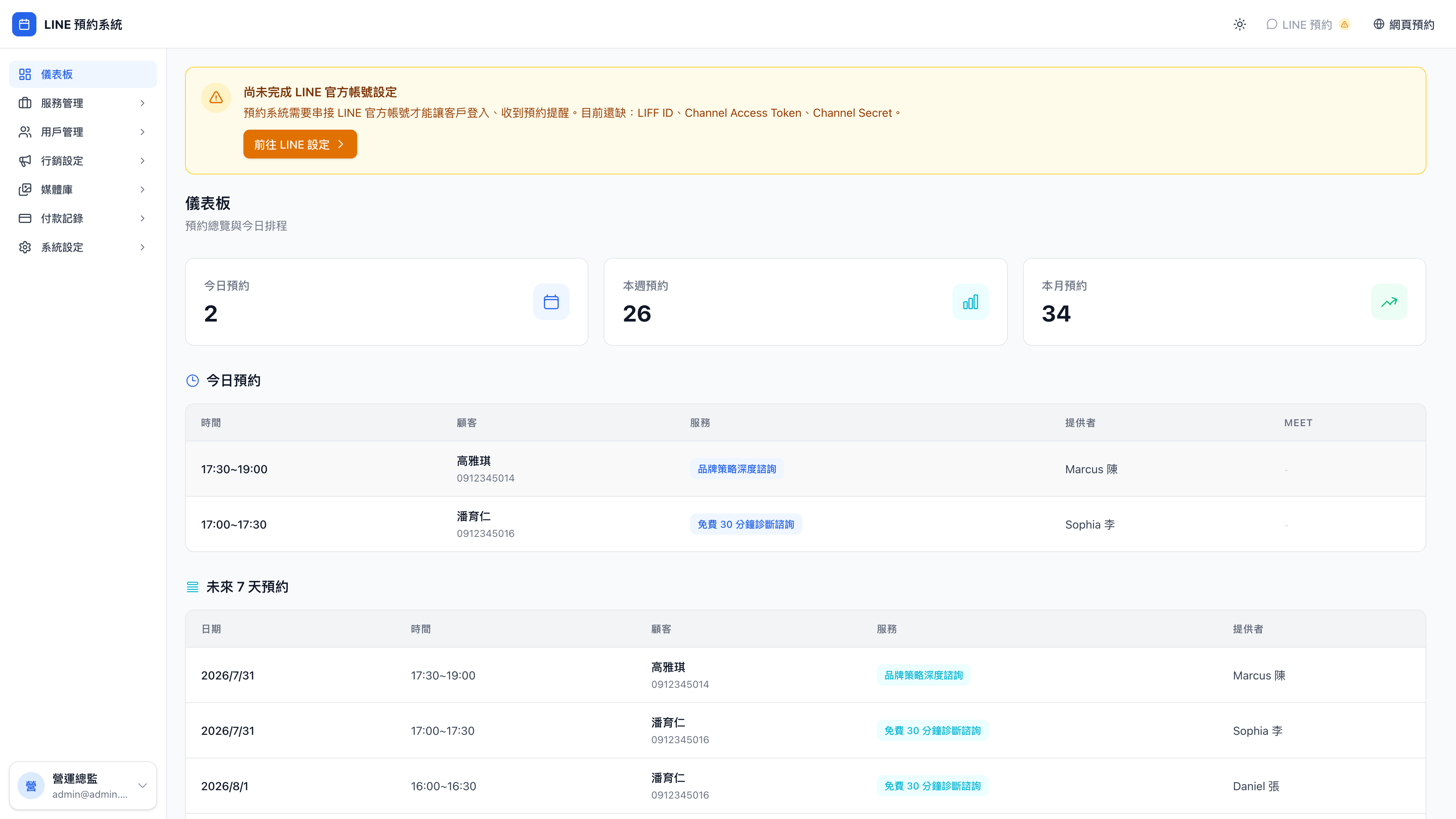
How many bookings today?
The very top shows the total number of today's outstanding bookings, along with the time of the next one, which client it's with, and which provider is taking it.
Use case: a glance before opening up
At 9:45am on the train, you open the dashboard on your phone: "6 today; next at 10:00, Mr. Chang, business model review, with Daniel." Now you know where you stand, and the moment you reach the office you can reserve the meeting room and pull up the notes from last time.
The same is true in other trades:
- A counseling practice: pull the case notes in advance rather than hunting for them on the spot
- A private tutor: review last week's sticking points before walking into the lesson
- Legal consultation: re-read the relevant cases and regulatory updates before the meeting
This used to mean phoning the front desk, or scrolling ten minutes of LINE group messages. Now it's ten seconds on your phone.
This week / this month
Shows how many bookings you've taken so far this week and this month, and whether that's up or down against the same point last month.
Question: Why does the figure look so low at the start of a month?
Because at the start of a month there simply hasn't been time to accumulate many bookings. This figure counts from the 1st of the month to now — the "this month" figure on 4/3 is only three days' worth, which is normal.
For the longer trend, look at the comparison against the same point last month: it tells you how much ahead of last month you'd finish if you carried on at this rate.
Use case: watching the growth curve at month end
Linda, a yoga teacher, opens the dashboard at the end of the month: "28 this month, 24 at the same point last month — up 17%." She knows the "bring a friend" pair class she launched mid-month is working, and plans to push it harder next month.
The monthly figure isn't there to tell you how many bookings you have. It's there to tell you whether this strategy is actually working.
Coming up
Lists the bookings due in the next 24 hours, in time order. Click any of them to open that booking's detail page.
Use case: preparing tomorrow morning before you leave
At 7pm before closing, you open Coming up: Daniel has a business model review at 10:00 tomorrow, and a two-hour deep consultation like that needs the client's details read in advance. You pull up what they wrote about their main revenue sources, do the homework tonight, and can get straight to the point when you walk in tomorrow.
Any service that requires preparation — a legal consultation, a first counseling session, an aesthetics treatment — should make Coming up a daily must-read before closing.
Why am I only seeing my own data?
If you signed in as a provider rather than an admin, the dashboard shows only your own bookings; other providers' don't appear. That's deliberate:
Question: Why can't providers see the whole business's bookings?
To protect client privacy. Each provider should see only their own clients, and shouldn't know other colleagues' clients' details — names, phone numbers, spending history, what was discussed.
This is the basis of client trust: someone gave their personal information to consultant A or therapist A, which doesn't mean every employee in the company should be able to see it. In high-privacy fields such as counseling, law and medicine, no separation means an ethics breach.
Question: I want to see the whole business's bookings for today, but I'm not an admin
Ask an admin to create an admin account for you, or to check for you from their own admin.
If you are the owner but signed in to find yourself with provider permissions, the account was created in the wrong place during setup — go to admin accounts and promote yourself.