Services
This page manages everything at your business that can be booked. The demo data for "Mingjing Strategy" includes: a free 30-minute diagnostic consultation, in-depth brand strategy consulting, a business model review, a digital transformation workshop, a quarterly advisory review, and pitch deck coaching — each one is a service.
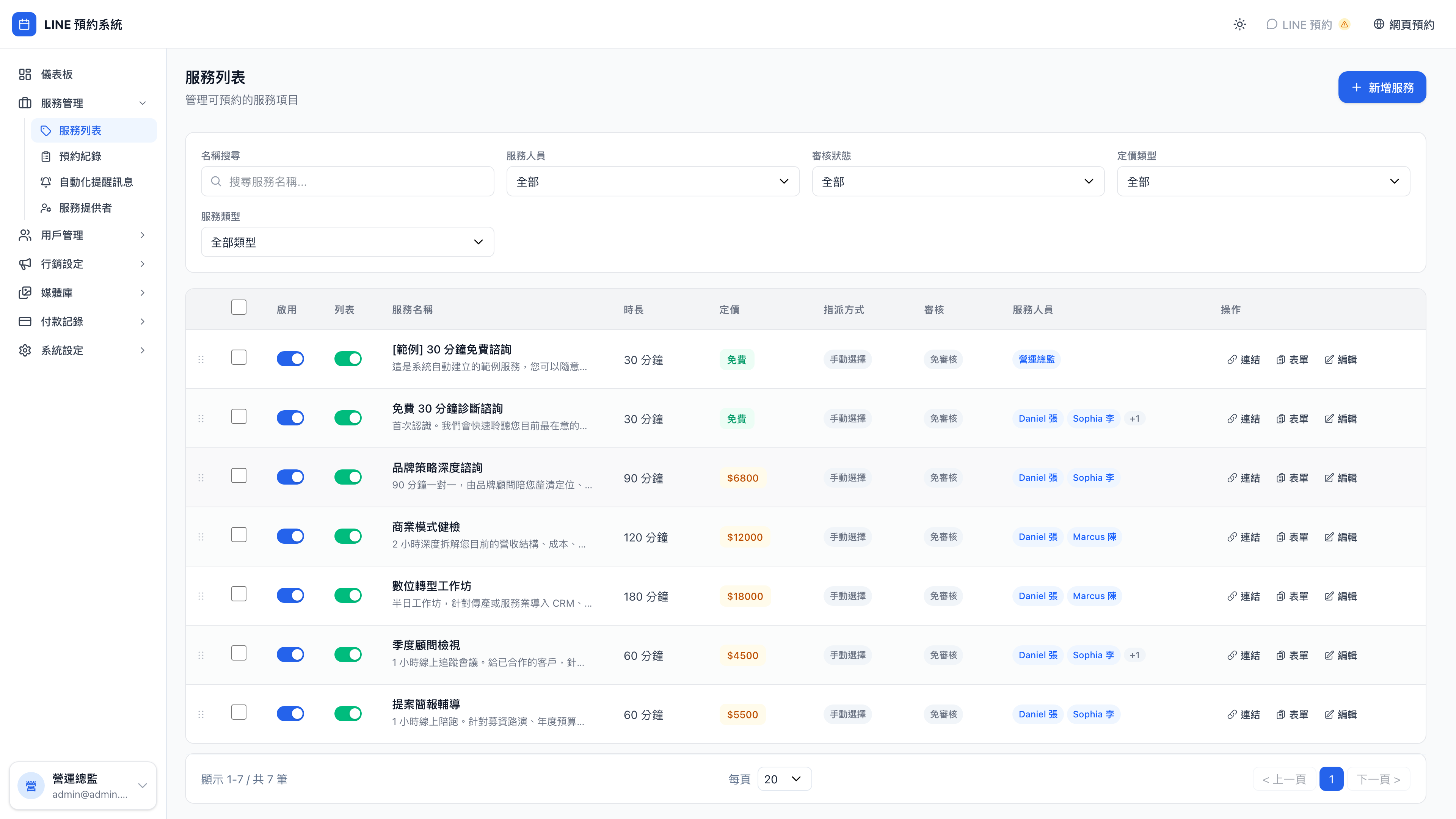
Clicking into any service shows its full settings and scheduling rules:
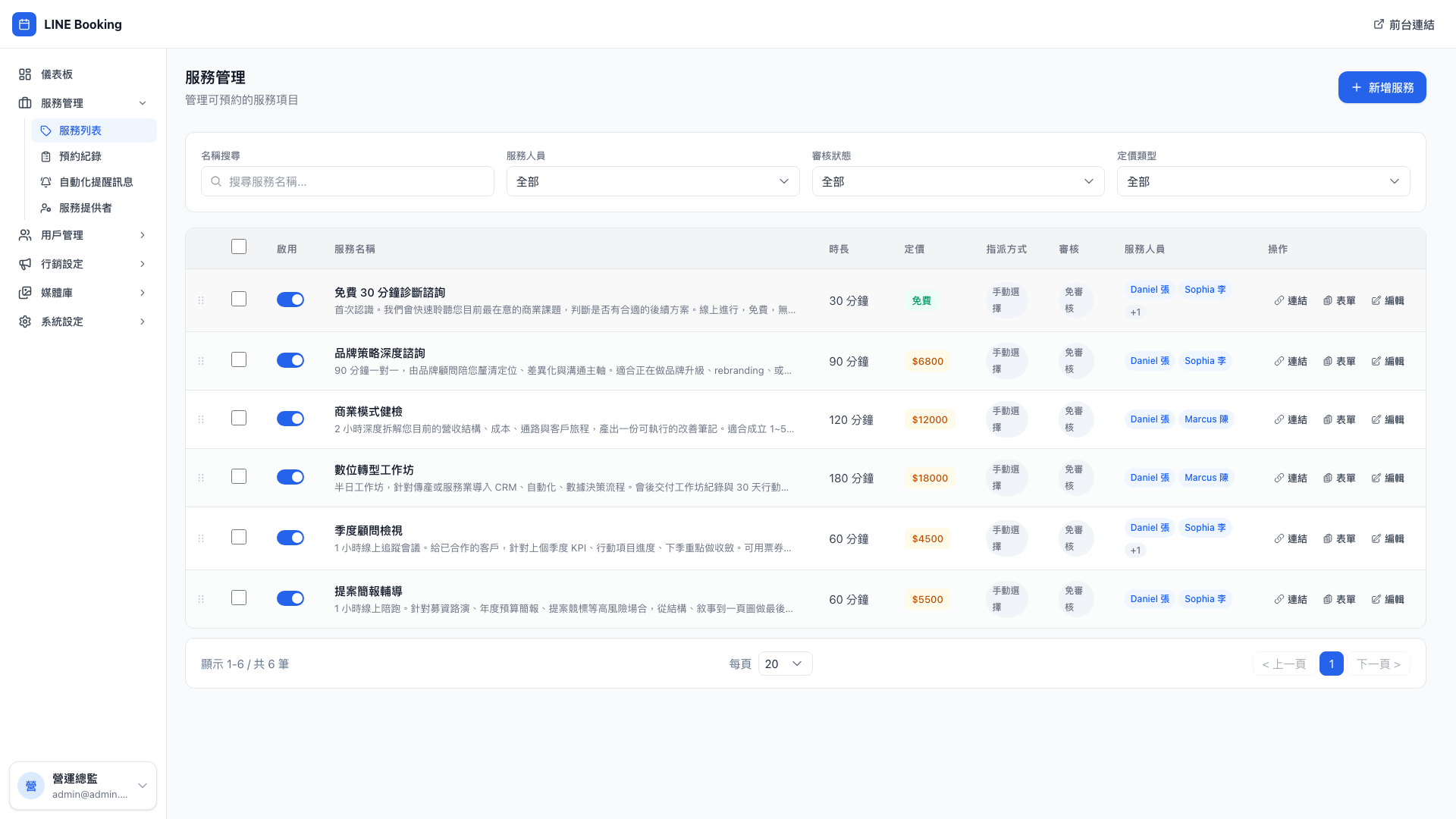
What should be a service?
A simple test: whatever the client books a unit of, that's a service.
- Business consultant: free diagnostic / brand strategy / business model review → three services
- Counseling practice: intake / general counseling / couples counseling → three services
- Law firm: 30-minute phone consultation / 1-hour meeting / contract review → three services
- Yoga studio: one-to-one / small group / group class → three services
- Aesthetics clinic: skin assessment / laser / injectables consultation → three services
Use case: should the same thing at different durations be separate services?
Mingjing Strategy originally had one service: "brand strategy consulting, 90 minutes". But the owner noticed some clients only needed a 30-minute quick check-in — a short discussion with none of the background-setting.
The recommendation is a new service, "30-minute brand quick check", with its own duration and its own price (NT$2,800, say). Clients can then see clearly what they're choosing, and a short conversation doesn't consume a 90-minute slot.
The principle: split when the durations differ substantially (by more than 30 minutes) or the prices differ substantially; merge when the difference is five minutes. The same applies to counseling — a 90-minute intake and a 50-minute session must be separate, but 50 and 55 minutes need not be.
Creating a service
New service at the top right opens the service form:
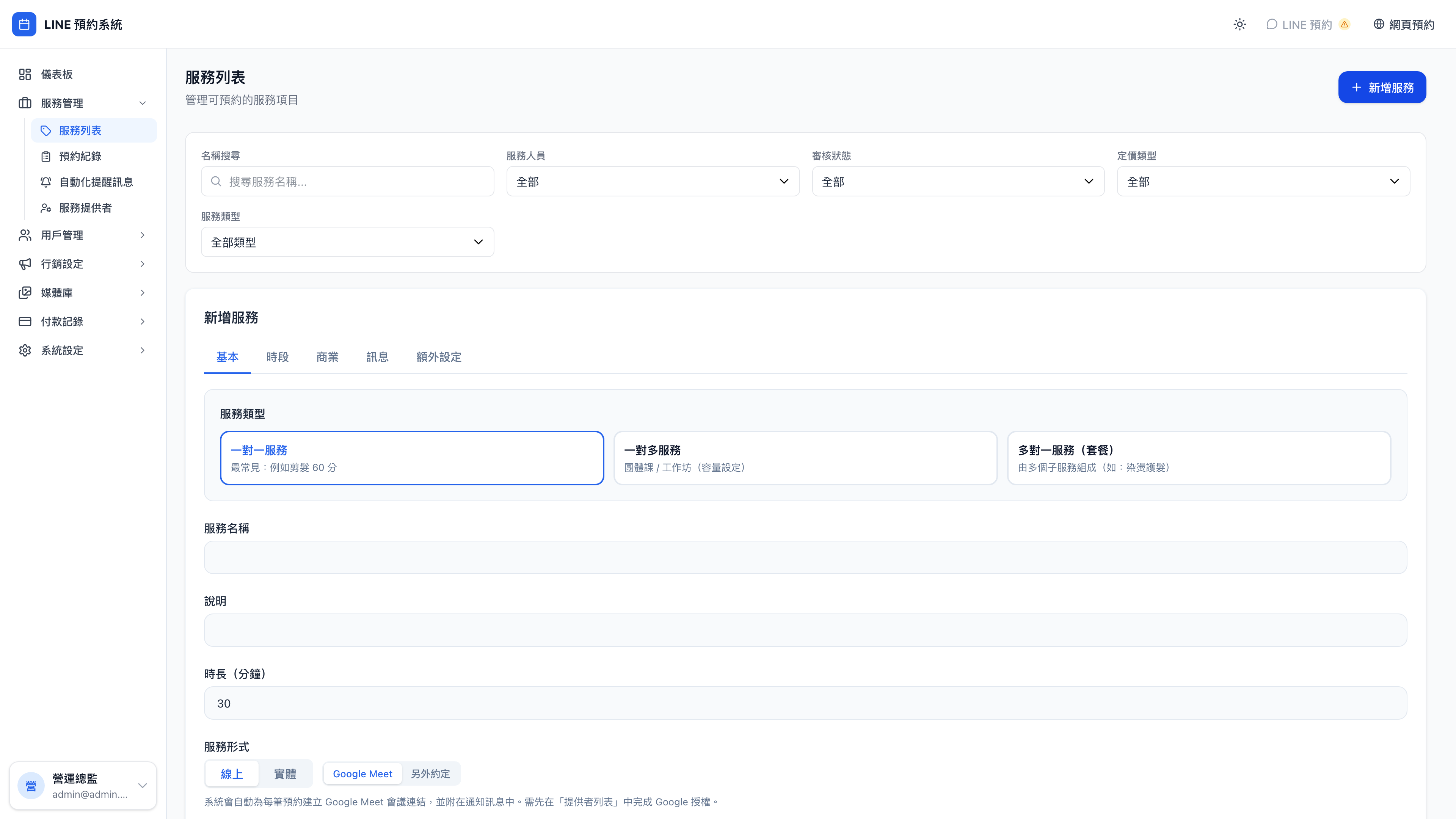
The main fields:
| Field | Meaning | Example ("brand strategy consulting") |
|---|---|---|
| Name | What clients see | In-depth brand strategy consulting |
| Description | The blurb clients read before booking | 90 minutes one-to-one clarifying positioning, differentiation and messaging |
| Duration | How long the service takes (minutes) | 90 |
| Buffers | Time to prepare before and wrap up after | 0 before, 15 after |
| Slot interval | How often a booking can start | 30 |
| Booking window | How far ahead clients can book (days) | 21 |
| Minimum notice | How many days ahead they must book | 0 |
| Price | What the service costs | 6800 |
Question: What's the difference between "duration" and "slot interval"?
- Duration = how long the client actually occupies you. A 90-minute brand consultation is a full 90 minutes.
- Slot interval = how far apart the selectable start times are on the booking page.
Suppose three clients all want 90-minute consultations on the same day:
- With a 30-minute slot interval, the available start times are 10:00, 10:30, 11:00, 11:30… one starting point every half hour
- With a 60-minute interval, they only see 10:00, 11:00, 12:00…
A finer interval gives clients more choice, but also produces awkward gaps — bookings at 10:00 and 11:30 leave 30 minutes in the middle that nobody can use. The general recommendation: set the slot interval to half the duration, or an exact fraction of it.
Question: When buffers and slot intervals conflict, which wins?
Buffers win. With a 90-minute duration, a 15-minute trailing buffer and a 30-minute slot interval:
- Client A books 10:00–11:30, which with the buffer runs to 11:45
- The next slot client B can book isn't 11:30 (even though that's a multiple of the 30-minute interval) but 12:00
The system accounts for buffers automatically, with nothing for you to work out.
Consultants routinely need buffer time to write up the key points of a session; aesthetics and counseling need the same gap between clients. The heavier the service, the longer the trailing buffer should be.
Advanced options
Online / in person / both (delivery mode)
Each service can be:
- In person (offline): fill in
locationInfo, e.g. "12F, No. 1 Songzhi Road, Xinyi District, Taipei" - Online: fill in
locationInfo, e.g. "Zoom / Google Meet — the meeting link is emailed once the booking is confirmed" - Both: if the same need, say brand consulting, should be available online and in person, create two services and configure each
Use case: running online and in-person side by side
Many consultants, therapists and lawyers have run both since the pandemic. The approach is two services:
- "Brand consulting · on site" NT$6,800 (offline)
- "Brand consulting · online" NT$5,800 (online)
The prices can differ (no venue cost, no travel), and clients see clearly which format they're choosing.
Requires approval
With this ticked, a client's booking is not confirmed immediately. It enters a pending approval state until you press approve or decline.
Use case: counseling and legal consultations need assessment
A counseling practice doesn't let just anyone book, because each therapist's specialism, availability and case fit matter. Ticking requires approval lets the therapist read the background the client supplied (collected through custom fields) and confirm they can take the case before approving.
The same applies to law firms handling criminal or family matters — a lawyer has every right to decline a conflict of interest or a case outside their specialism.
Ordinary paid consultations usually don't need approval (a client who comes wants a consultation). But for a high-value business model review, you may want to check the industry is a fit first, in which case turn approval on.
Assignment method
| Option | Meaning |
|---|---|
| Manual | The client chooses which provider they want |
| Round robin | The system assigns automatically, balancing by each provider's workload over the past 7 days |
Question: When should I use round robin?
Two situations:
- The service is interchangeable and the client doesn't mind who provides it: a group fitness class, where coach A and coach B teach much the same content; or a free 30-minute consultation for new clients, where anyone can take it.
- You want workload spread evenly: so your star consultant isn't booked solid while another has nothing.
Consulting and counseling usually turn round robin off (clients ask for a specific person), but for services where the person doesn't matter — a free new-client consultation, say — turn it on and let workload balance itself.
Ticket-only booking / allow ticket redemption
If a service has allow ticket redemption enabled, clients holding a relevant ticket can redeem it at payment. Tick ticket-only booking as well and clients cannot pay in cash to book it.
Use case: review tickets bundled with an annual plan
When Mingjing Strategy sells its annual advisory plan, it includes four "quarterly advisory review" tickets. For that service:
- Tick allow ticket redemption → clients can redeem a ticket to book at no charge
- But don't tick ticket-only booking → clients without a ticket can still book at NT$4,500
A different case: an aesthetics clinic's "new client laser trial" must be booked with a trial ticket (so clients can't bypass the trial card and buy at full price), which means ticking both.
Allow points redemption
With allow points redemption enabled, accumulated points can offset the price at checkout. pointsPerUnit: 1 means 1 point offsets 1 in currency, which is the usual setting in consulting.
Notification messages
Every service can have its own LINE and email messages sent to the client, the provider and admins when a booking is created, rescheduled or cancelled.
Variables can be written directly into the message and the system substitutes them:
| Variable | Substituted with |
|---|---|
{{姓名}} | The client's name |
{{服務名稱}} | The name of this service |
{{日期}} | The booking date |
{{時間}} | The booking time |
{{提供者}} | Which provider |
Note: the variable names are literal, in Chinese
These are the product's actual variable names, so type them exactly as shown — {{姓名}}, not {{name}}. An unrecognized name isn't substituted.
Use case: a different tone per service
- Free diagnostic consultation, on booking: "Hello {{姓名}}, your 30-minute diagnostic is confirmed ✨ Time: {{日期}} {{時間}}. The meeting link has been emailed to you. Please test your microphone and connection 5 minutes beforehand."
- Business model review, on booking: "Hello {{姓名}}, your business model review is confirmed 📊 Please email us last quarter's P&L and a list of your main clients at least 48 hours before the meeting, so we can diagnose more precisely."
Different notes for different services spare clients from getting it wrong, and spare you from answering the same question repeatedly.
Form fields (custom questions)
Each service can have custom fields, gathering the information that matters at the moment of booking.
Use case: the custom fields consultancies use
Mingjing Strategy designed different fields for different services:
- Free diagnostic:
- "The business problem you most want to solve (1–2 sentences)" (textarea, required)
- "Your company's stage" (radio: not yet incorporated / under 1 year / 1–3 years / 3–5 years / over 5 years)
- Business model review:
- "Current team size" (radio)
- "Your main revenue sources, briefly" (textarea)
- Pitch deck coaching:
- "What's the deck for?" (radio: fundraising / internal budget / a client pitch / a government tender / other)
At a counseling practice these become:
- "Have you had counseling before?" "What's troubling you most at the moment?" "What counseling style do you prefer?"
The principle: every question that would waste time if you had to ask it on the day should be a custom field.
Ordering
The service list supports drag to reorder. The order clients see on the booking page is this order.
Note: put your main services first
Put the service you most want to sell, with the best margin, at the top. Many clients open the booking page and tap whatever looks right, so the order affects your revenue mix.
The flip side: putting the free or cheapest service first dilutes conversion — clients see "free 30 minutes", tap it, and never scroll down to the NT$18,000 workshop. Unless a free-first funnel that later sells high-value work is exactly your strategy.