Customer tags
A tag is your tool for classifying members. It's like sorting a card index into "old friends", "new clients" and "key accounts" — after which messaging, revenue analysis and campaigns can all target just one pile.
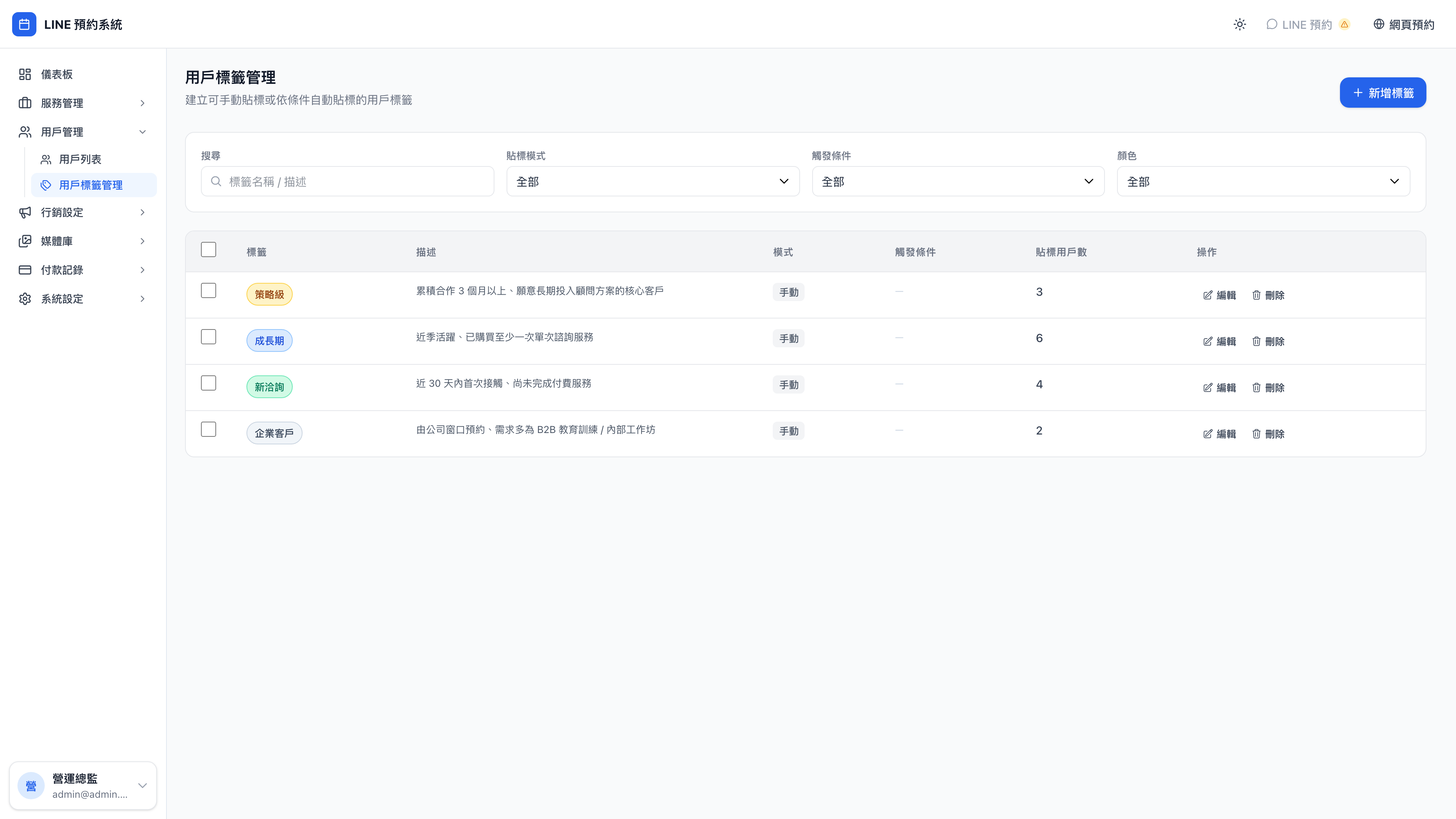
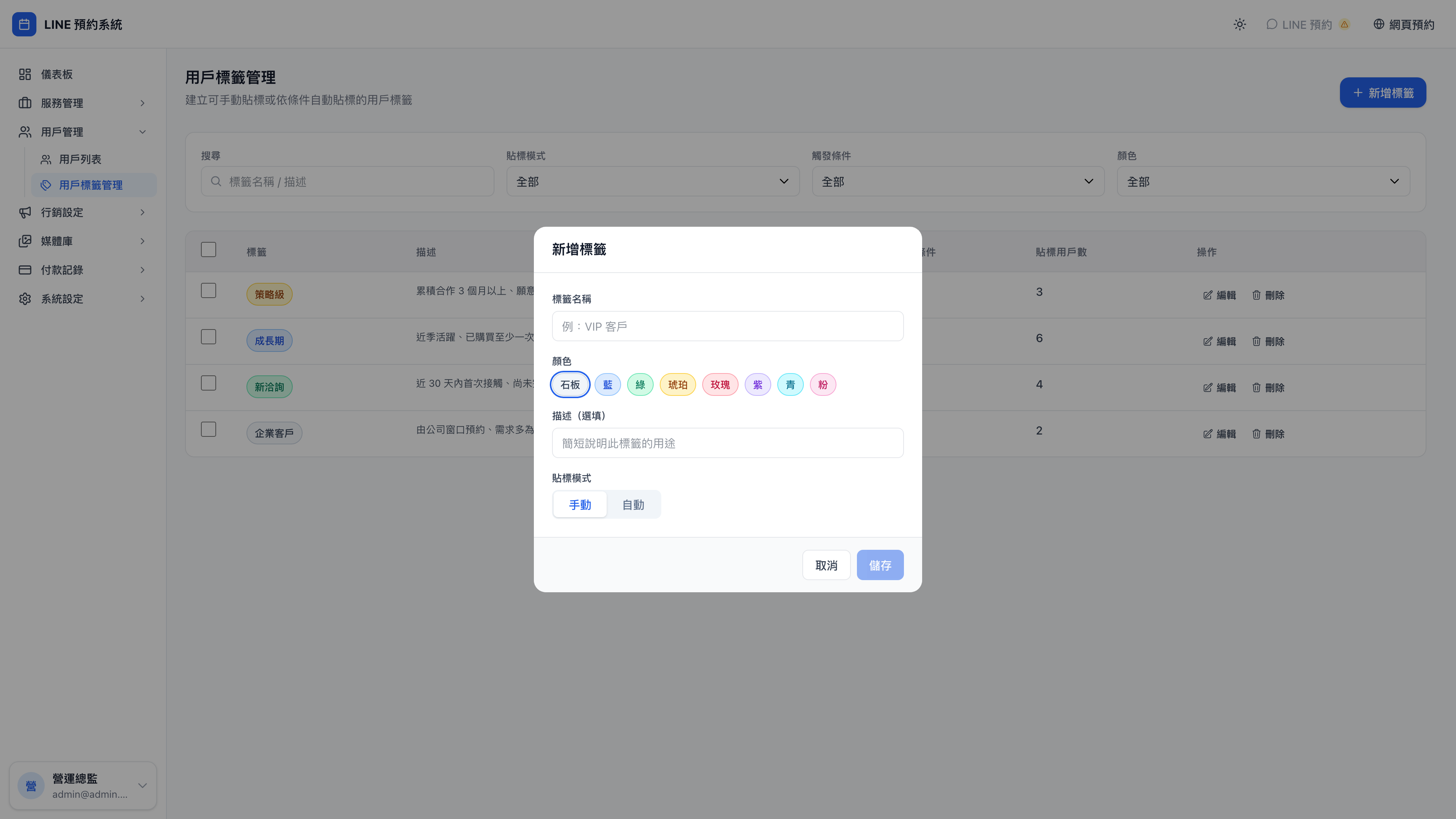
The new tag form:
Why tags?
Use case: with and without tags
Without tags: at month end you want to invite strategic tier clients to an exclusive dinner. You open client records one by one, check cumulative spend, pick out those who qualify — an afternoon's work to reach 50 people.
With tags: filter by the "strategic tier" tag → select all → send. One minute.
Tags aren't extra work. They're the infrastructure that saves you time in daily operations.
The demo business's four tags
Mingjing Strategy comes with four:
| Tag | Color | Who it's for | Suggested rule |
|---|---|---|---|
| Strategic tier | Amber | Core clients of three months or more, committed to a long-term advisory plan | Automatic |
| Growth stage | Blue | Active this quarter, having bought at least one one-off consultation | Automatic |
| New enquiry | Green | First contact within 30 days, no paid service yet | Automatic (on adding you on LINE) |
| Enterprise | Purple | Booked by a company contact; B2B training or internal workshops | Manual |
Question: Why separate new enquiry, growth stage and strategic tier?
Because the three segments call for three different communication strategies:
- New enquiry → educate and build trust (case studies, white papers, an invitation to a free consultation)
- Growth stage → convert and recommend the next step ("you've had brand consulting; a business model review is the natural next step")
- Strategic tier → maintain the relationship (QBRs, birthday gifts, an annual dinner)
Message everyone as though they're the same person and new clients find it too salesy while long-standing ones find it impersonal — you disappoint both.
At a counseling practice the equivalent is intake clients, general counseling clients and long-term stable cases — each needing a completely different tone.
Creating a tag
Press New tag:
- Name ("asks for a specific consultant", "industry: technology", "opted out of marketing")
- Color (for the list display)
- Description (a note to your future self)
- Trigger:
- Manual: an admin applies it
- Automatic: applied by the system when conditions are met
The automatic rule types
| Trigger | When it applies |
|---|---|
| Added as friend | When the client adds your LINE Official Account |
| Booked a service | The client booked a specified service |
| Completed a service | The client completed a specified service |
| Received a campaign reward | The client received a given campaign reward |
| Reached a spend threshold | Cumulative spend reaches X |
| Reached a booking count | N cumulative bookings |
Question: What's the practical difference between "booked a service" and "completed a service"?
Timing.
- "Booked a service" applies the moment the client presses the book button → good when you want to start an automated sequence right away ("send the pre-meeting checklist as soon as they book a business model review")
- "Completed a service" applies only once the service has been delivered → good when you need to be sure they actually turned up and experienced it ("send a satisfaction survey 3 days after the consultation")
The guideline: anything that costs you money (a gift, a physical voucher) should use "completed"; simply sending a message or building a record can use "booked".
What tags are for
Filtering the customer list
"Show strategic tier only", "show new enquiries only" — the most basic use.
Triggering marketing messages
Under marketing messages, configure: "when a client is tagged 'new enquiry' → start the 7-day new client nurture flow". Tags are the entry point to all automation.
Use case: tags, campaigns and messages chained together
- Design a campaign: "cumulative spend of 30,000 → issue 2 quarterly review tickets" (under campaigns)
- Design a tag: cumulative spend of 30,000 → automatically tag "strategic tier" (on this page)
- Design a marketing message: on being tagged strategic tier → send "welcome to the strategic tier; here are your benefits…" (under marketing messages)
The instant a client's cumulative spend crosses the threshold, all three fire together: the campaign issues tickets, the strategic tier tag is applied, and the welcome message goes out.
Three separate features, chained together by a tag — which is exactly why tags are the core tool.
Manual vs. automatic
One client can carry both manual and automatic tags. On their profile, each tag shows its source on the right:
| Marker | Meaning |
|---|---|
| Manual | Applied by an admin |
| Automatic | Applied by a rule |
Question: If I manually remove an automatically applied "strategic tier" tag, will it come back?
Yes. Automatic rules re-evaluate periodically, and as long as the client still meets the condition (cumulative spend is still ≥ 30,000), the next evaluation applies it again.
To exclude a client from a tag permanently, don't remove it by hand — block them, or change the rule's conditions.
Note: don't over-tag
A client carrying ten tags loses the point of tagging (you'll almost never find anyone with only one of them).
The recommendation: keep 5–10 active tags across the business. More than that means your definitions are too granular and can be merged — "likes laser", "likes brightening" and "likes RF" can all become "anti-aging treatments".