My bookings
Clients can review their own booking history at any time — My at the top right of the booking page → My bookings.

This page covers what data they see and what they can do for themselves.
The list clients see
Identified by their LINE account, every related booking is listed. Each shows:
- Service name
- Date and time
- Provider
- Status
What the five statuses look like to a client
| Status | What the client sees | What you see in the admin |
|---|---|---|
| Pending approval | "Booking requested" | Pending approval |
| Confirmed | "Booking confirmed" | Confirmed |
| Completed | "Completed" | Completed |
| Cancelled | "Cancelled" | Cancelled |
| On hold | "In progress" | On hold |
Question: Why does the admin use different wording from the client view?
Admin wording is the business's management language (precise, internal terminology); the client view uses user-friendly language (intuitive and easy to grasp).
For instance, the admin calls it on_hold (an English code) while the client sees "in progress" — the client doesn't need to know what a hold is, only that the business hasn't decided yet.
This is exactly why a design system needs the admin view and the client view kept apart.
What clients can do themselves
It depends on the booking type and your settings:
Reschedule (per service settings)
If the service allows clients to reschedule themselves, confirmed bookings get a Reschedule button. Tapping it opens slot selection, and once changed the system sends a "your booking time has been updated" notification.
Question: Should I let clients reschedule themselves?
In most cases, yes. Because:
- It saves you time (no back-and-forth on LINE)
- It's a better experience (they change it when they want, without waiting for a reply)
- The system checks the new slot is free, so no clash can arise
When not to allow it:
- When you want the rescheduling conversation to establish "are you really unable to come?"
- When the booking carries high preparation cost (aesthetics, senior consulting, bespoke treatments) and rescheduling wastes materials or preparation
It's set per service, so different services can have different policies. A free consultation can be freely rescheduled while a high-value workshop requires manual confirmation.
Cancel (per service settings)
Usually permitted up to N hours before the service. Past that point, they have to contact you.
Use case: why "24 hours before"?
The purpose of the limit is giving the business time to fill the slot.
Picture it: a client due in the morning changes their mind an hour beforehand. There's no time at all to get another client in, so the slot is simply lost.
Setting "24 hours before" means the business can at least release the slot the day before and offer it to someone else.
General guidance:
- Short services (30–60 minutes): 12 hours
- Medium services (90–120 minutes): 24 hours
- Long or high-cost services (half-day workshops, expensive treatments): 48 hours
How pre-booking reminders appear to clients
Depending on what you set under automated reminders, clients receive a message in their LINE conversation with a link that opens that booking directly.
Use case: what a LINE reminder looks like in practice
A client has a business model review at 14:00 tomorrow, and at 8pm tonight receives a message from your Official Account:
"Hello Ms. Chen, a reminder that your business model review is at 14:00 tomorrow. It's worth writing your discussion topics down in three sentences today and preparing a 5-minute version of your company introduction, so we can get straight to the heart of it."
Below the message is a View booking button, which opens My bookings with that booking already selected.
This is a considerably better experience than a traditional SMS — SMS is text only, while LINE carries images, buttons and map links.
The profile tab
The same member area has a Profile tab where clients can edit their own name, phone and email:
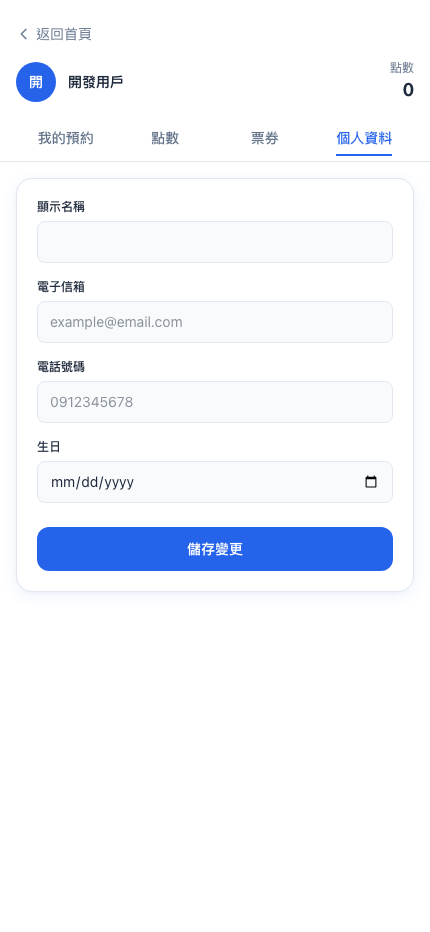
The benefit: clients who move or change number can update it themselves, without calling you to have it changed by hand.
History is kept indefinitely
My bookings never deletes history automatically, so clients can see records from a year ago.
Question: What is that history good for?
For the client:
- Remembering what they did last time ("last time's action items are in the notes")
- A sense of how much they've used and spent
For you:
- When a client arrives you can check what they had last time, and greet them properly
- It's the data foundation for win-back strategies ("an offer for clients who haven't been in 3 months")