Users
Everyone who has interacted with your LINE Official Account appears in this list automatically.
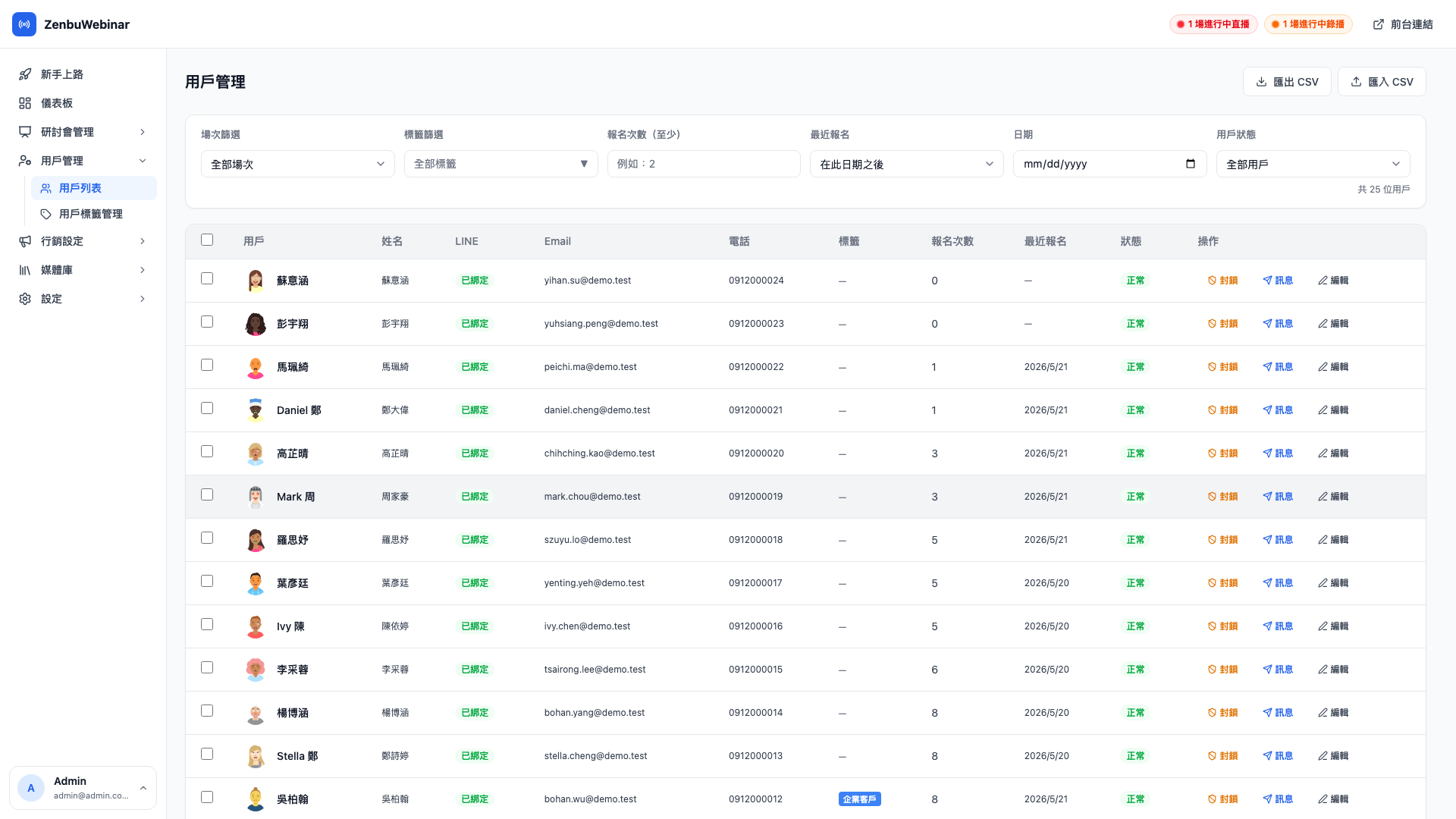
How people get onto this list
Any one of these actions creates a record:
- Adding your LINE Official Account as a friend (recorded even if they never sign up for anything)
- Signing in with LINE to register for any webinar
- An admin creating them by hand (uncommon — a list brought back from an offline event, say)
From then on, everything that person does — sessions signed up for, watch progress, tags applied, position in automation flows — accumulates on their detail page.
The fields
| Field | Source |
|---|---|
| Avatar + LINE display name | Provided by LINE |
| Name / Email / Phone | What they entered when signing up; admins can edit it too |
| Friend since | When they first added your Official Account; blank for visitor signups |
| Sessions signed up for | The running total (each occurrence of a recurring session counts once) |
| Sessions attended | Sessions they actually watched to the attendance threshold |
| Tags | Every tag on this person (with their color chips) |
| Blocked | Blocked users receive no LINE notifications at all |
Filtering
The filters at the top combine:
- By tag: one group only ("VIP customers", "superfans")
- By friend status: isolate "friends who never signed up" or "signed up but never added as a friend"
- By blocked status: review the block list
- By name / email search: find a specific person while handling a support request
Use case: finding dormant superfans
Filter by has the "superfan" tag plus last signup ≥ 60 days ago.
That gives you the core fans who used to love what you do but haven't been back lately. Bulk-tag them "dormant superfan" and start a dedicated win-back flow: "How have you been? I've put together something just for long-standing students."
Bulk actions
Tick several users and you can:
- Bulk-tag: pick a group by hand and tag them
- Bulk-untag: remove a tag
- Export CSV: export the selected columns for the whole batch
- Bulk block / unblock: for dealing with spam accounts
Use case: hand-picking "co-creation candidates"
After an event you know ten people commented thoughtfully and were willing to leave contact details.
- Search those ten names in the user list → tick them
- Click Bulk-tag
- Choose "co-creation candidate" (a manual tag)
When you next send a dedicated invitation, just filter on that tag.
The user detail page
Click anyone in the list to open their detail page, which shows:
- Profile (editable by hand): name, email, phone, notes
- Every signup: which sessions, which occurrence, whether they attended, how far they watched
- Watch history timeline: when they entered each live room, and the last timestamp they reached
- Their tags: including where each manual or automatic tag came from
- Automation flows in progress: which step of the post-signup nurture flow they're on, and when the next message goes out
- Tracking event log: which Meta Pixel events they've triggered
Use case: checking someone's record before replying to them
A user messages you: "I missed that last session."
Search their name in the user list → open the detail page → see they signed up for 3 sessions, attended 2, and are on step 2 of the post-stream follow-up flow → you now know exactly how to reply (send the replay link for the session they missed, and pause their next scheduled push so they aren't messaged twice).
Blocking
If someone blocks you on LINE, the system detects it and marks them blocked. From that moment:
- No further messages are sent to them (which avoids wasting LINE push quota)
- Their history is retained for later analysis (what tags do people who block you have in common?)
- If they unblock and add you again, the system clears the blocked status automatically
You can also block someone manually (a persistent troublemaker, say), with the same effect.
Question: If a blocked user later unblocks, is their data still there?
Yes. Signups, watch history, tags, automation progress — the whole history is retained. When they add you back on LINE the system clears the blocked flag, they start receiving messages again, and nothing they'd accumulated is lost.
Question: What's the difference between "total users" and "friends"?
Total users counts everyone who has ever interacted, including people who unfriended you, people who are blocked, and visitor signups who never added you at all.
Friends counts only people currently friends with your LINE Official Account — a figure that should closely match the friend count in your LINE Official Account console (the difference being that visitor signups aren't included).
The wider the gap between the two, the more people were once interested and later unfriended you, which may mean your message frequency is high enough to irritate.
Want the list synced to your newsletter platform?
Registrant emails can sync automatically to Beehiiv, Mailchimp or ConvertKit — configured under newsletter integrations, with no manual export and import each time.