Session list
The page a user sees when they open an "all sessions" link, whether inside LINE, from a sales page, or in a desktop browser.
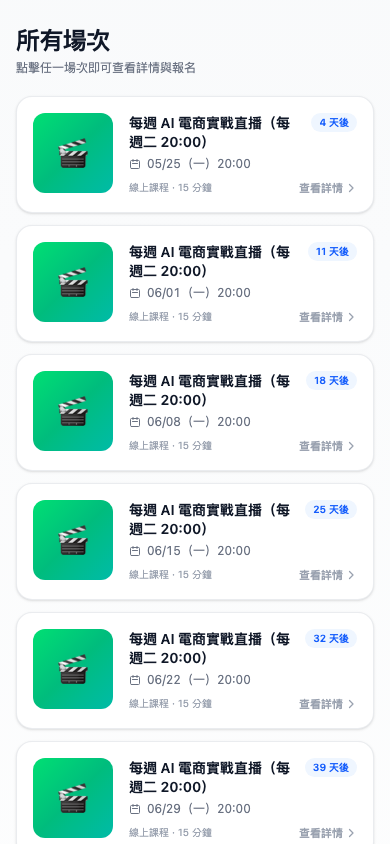
Which sessions appear here?
The system automatically shows:
- Sessions with the status Published
- One-off sessions whose time hasn't passed
- The next occurrence of a recurring (WEEKLY / MULTI) session
Ended sessions and sessions still in draft do not appear.
Use case: a user finding sessions from the LINE rich menu
You've put an All sessions button in your LINE Official Account rich menu, linking to the session list.
A long-standing user wondering "when's the next stream?" taps it and sees "AI E-commerce in Practice (every Tuesday 20:00) — in 5 days", "Winter intensive: FB/IG ads (multiple sessions) — tomorrow 12:30"… the next wave of streams at a glance.
What's on a card?
- Left: the session cover image (a default clapperboard icon if none is set)
- Middle: session title, next start time, video length or stream duration
- Top right: how long until it starts ("in 2 days", "tomorrow", "LIVE", "in 1 hour")
- Bottom right: a View details → button
Tapping any card opens the session detail page.
Sort order
Sorted by next start time, soonest first:
- Live now and playing now always sit at the top (with a red LIVE marker)
- Then starting soon, in ascending time order
- Recurring sessions show only their next time, rather than listing every occurrence
- Ended and draft sessions don't appear
This ordering guarantees that what a user sees on opening is what's most worth their attention right now.
Pagination
Beyond 10 sessions, scrolling loads more automatically. There's no "next page" to press.
Waiting for another session
Not every user arrives to find a time that suits them. A fixed bar sticks to the bottom of the session list: small text on the left reading "No suitable time? Register and we'll notify you on LINE when new sessions open", and a ⏳ Wait for another session button on the right.
Tapping and confirming adds them to the waitlist — as soon as a new session opens, the system notifies them over LINE automatically. This button catches the users who'd otherwise simply leave because nothing fits.
- The button is fixed to the bottom of the screen, so it doesn't disappear as they scroll and is always tappable
- They must be signed in with LINE to register (notifications go out as LINE pushes, so unlinked users are prompted to sign in first)
- A user who has already registered sees the button in a registered state, and can tap again to cancel
Use case: keeping the people whose schedule clashes
Hsiao-yu works office hours and has to stay late on Tuesdays. He looks at the sessions, finds every time clashes, and is about to close the page — the Wait for another session button at the bottom keeps him with one tap. Two weeks later you add a Saturday session, and Hsiao-yu gets a LINE notification that day and comes back to sign up.
Send frequency, repeat reminder rules and send now are all configured in the admin — see the admin-side waitlist documentation.
Will they be notified about sessions they saw when registering?
No. The system only notifies them about sessions that appeared after they registered. Sessions already on the list at that moment, which they saw and chose not to sign up for, are never pushed back at them — there's no point bothering someone with what they've just passed over.
Do users have to add me as a friend to see this?
No. All three states can see the session list:
| State | Can see the list | Can sign up | Can receive LINE notifications after signing up |
|---|---|---|---|
| Signed in to LINE + added as friend | ✅ | ✅ | ✅ |
| Signed in to LINE + not a friend | ✅ | ✅ | ❌ (only after adding you manually) |
| Guest (not signed in to LINE) | ✅ | ✅ | ❌ |
In practice, desktop browser visitors are guided automatically through LINE sign-in and adding you as a friend (see sales page setup), so almost everyone ends up in the first state.
Question: Can users see how many other people have signed up?
No. The list shows only the session's own information and never reveals other people's signup numbers. Figures like "22 signed up, 15 attended" are visible only to you in the admin.
If you want to create a sense of momentum, write something like "100+ students already signed up 🔥" into the session description yourself.
Question: Does tapping a live session go straight to the live room?
No — it goes to the session detail page first. The reasoning: the user may not have signed up or signed in yet, so it makes more sense to let them confirm the details before entering.
If you want a "one tap straight into the stream" experience, send the /session/{id}/live link directly to registered users in reminder and go-live messages.