My registrations
The page where a user checks which sessions they've signed up for, inside LINE.
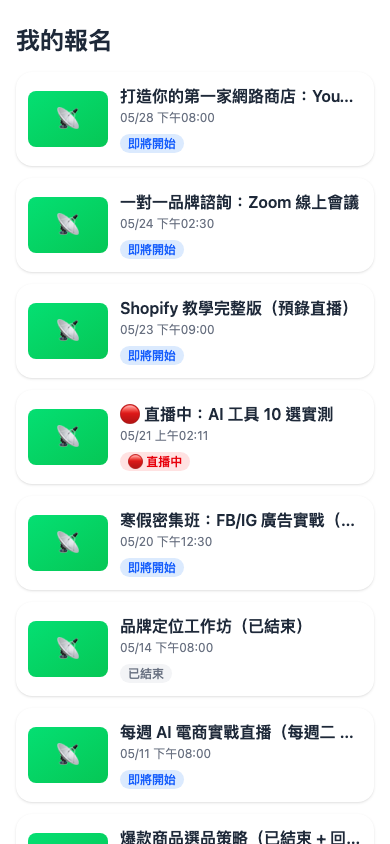
What it lists
- Every session the user signed up for — upcoming, in progress and ended alike
- Sorted by time, most recent first
- Each card shows: session name, occurrence time, and a status badge
Tapping a card returns to the session detail page, where they can see what they entered when signing up, or enter the live room.
Use case: a user who can't remember what they signed up for
Hsiao-chi signed up for an AI e-commerce stream three weeks ago but has forgotten the exact time. She opens LINE → your Official Account → the My registrations button in the rich menu → and sees "Winter intensive: FB/IG ads (multiple sessions) — tomorrow 12:30" at a glance, and knows how to plan her day.
Putting a link to this page in your Official Account's rich menu is the simplest way to stop people drifting away — they come back on their own.
The three states
| Status badge | Meaning | What they can do |
|---|---|---|
| 🕒 Upcoming | Signed up; the start time hasn't arrived | View details, add to calendar, cancel signup |
| 🔴 Live | Streaming now | Enter the live room directly |
| ✅ Ended | The stream has finished | Watch the replay if there is one; otherwise view the details only |
Do they have to be a LINE friend?
They must be signed in with a LINE account, but they don't have to have added you.
- Signed in + added as friend → fully displayed, and they receive follow-up reminders
- Signed in + not a friend → they can see the page, but won't receive go-live reminders
- Guest (not signed in to LINE) → nothing is shown; they're prompted to sign in with LINE first
This page shows data for "me", and the system needs a LINE userId to filter out your signups.
Question: Will switching LINE accounts on the same phone show different data?
Yes. This page follows whichever LINE account is currently active, so after switching you see the new account's signups.
Few people run several accounts on one phone in practice, but if you keep separate family or work accounts, remember that "me" means whoever is currently signed in on the LINE side.
Question: I signed up for a session but it isn't shown here
The two most common explanations:
- That signup was made as a guest (not signed in to LINE at the time), so it doesn't belong to you as a LINE user
- The session has been deleted by an admin, which removes the associated signups with it
For the first case: have the user go back to that session's detail page, sign in with LINE and sign up again, and the system associates this signup with them. The earlier guest signup remains as a separate record and isn't merged automatically.
Putting this page in your LINE rich menu
Go to the LINE Official Account Manager (manager.line.biz) → Home → Rich menu → add a button linking to the /my path. The full URL format:
https://liff.line.me/{your LIFF_ID}/mySuggested button labels:
- "My registrations"
- "My events"
- "📚 My courses"
Users can then open LINE, tap the menu and land here at any time — with no need to send them a link each time. Your core fans come back on their own.