Waitlist
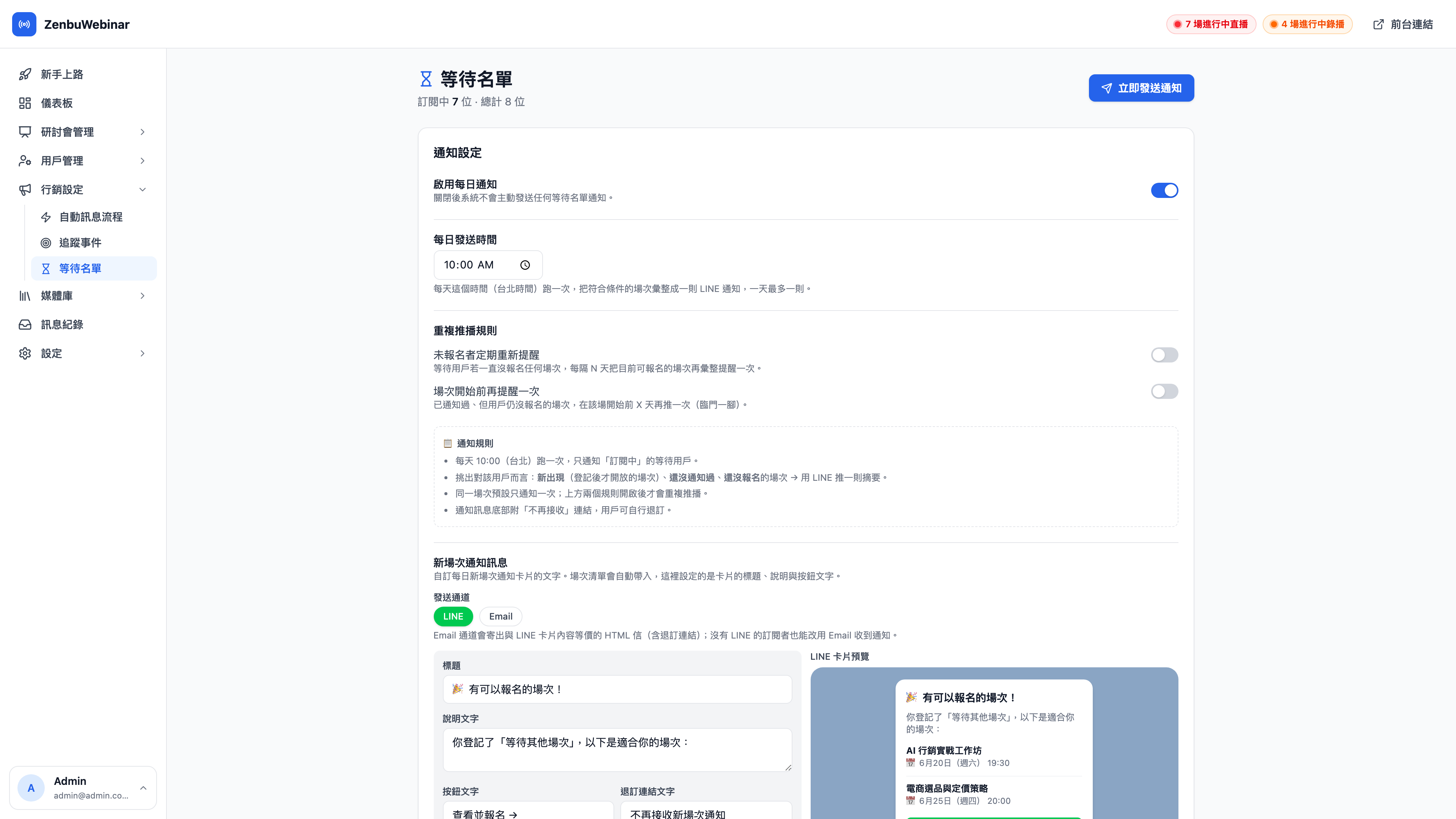
Not everyone who opens your session list finds a time that works. The waitlist keeps hold of the people for whom none of the current times fit — as soon as a new session opens, the system notifies them over LINE, retaining prospects you'd otherwise lose.
How people join the waitlist
At the bottom of the session list page in LINE (LIFF) there's a fixed bar reading "No suitable time? Register and we'll notify you on LINE when new sessions open", with a ⏳ Wait for another session button. Tapping and confirming makes someone a waitlist member (see the attendee documentation).
From then on, whenever new sessions come into their visible range, the system gathers them into a single LINE message pushed at a fixed time each day.
Use case: catching the people whose schedule doesn't fit
Yi-chun runs "AI E-commerce in Practice" every Tuesday. Hsiao-yu, who works office hours, has to stay late on Tuesdays; he looks at the session list, finds every time clashes, and is about to close the page — the Wait for another session button at the bottom is what keeps him.
Two weeks later Yi-chun adds a Saturday afternoon session on the same topic, and Hsiao-yu gets a LINE message that morning: "🎉 There's a session you can join!" He taps through and signs up. Without that button, Hsiao-yu was already lost.
Notification settings
The upper half of the page configures how this list is notified. All of these settings are shared across the whole site, not per session.
Enable daily notifications
The master switch. With it off the system sends no waitlist notifications at all (existing members are retained; they simply aren't pushed to).
Daily send time
Defaults to 10:00 (Taipei time). The system runs once a day at this time and gathers every qualifying session into one LINE notification — at most one per day, so nobody gets flooded.
Question: Why one daily digest rather than pushing the moment a session is created?
To avoid nagging. If you create five new sessions at once, instant pushes would send five separate messages to every waiting user; a daily digest combines them into one "there are 5 sessions you can join". It's a much better experience, and the block rate is lower.
Repeat push rules
By default, one user is notified about one session only once. To push a few more times at people who never act, turn on either or both of these rules:
| Rule | Behavior | Good for |
|---|---|---|
| Periodic reminder for non-registrants | If a waiting user still hasn't signed up for anything, re-send a digest of currently available sessions every N days | Reawakening prospects who've gone quiet |
| One more reminder before a session starts | For a session already notified where the user still hasn't signed up, push again X days before it starts (a final nudge) | The last call before you go live |
Use case: how the two rules work together
- Periodic reminder for non-registrants: every 7 days — the people who registered and then went silent get a gentle weekly nudge about what's currently available.
- One more reminder before a session starts: 1 day before — a session they were told about but never signed up for gets pushed again 24 hours before, catching the group whose "let me think about it" finally becomes "fine, I'm in".
The notification rules summary
A 📋 Notification rules block at the bottom of the settings card spells out the actual logic:
- Runs once a day at the specified time (Taipei), and only notifies waiting users who are subscribed.
- Picks out sessions that, for that user, are newly appeared (opened after they registered), not yet notified about, and not yet signed up for → pushes a summary over LINE.
- One session is notified once by default; the two rules above are what enable repeat pushes.
- The message carries an unsubscribe link at the bottom, so users can opt out themselves.
Remember to press Save settings at the bottom right once you're done.
Sessions they'd already seen aren't pushed again
This is easy to overlook and matters a great deal: the sessions already on the list at the moment someone tapped "Wait for another session" are ones they saw and chose not to sign up for. The system marks those as already seen and never treats them as new sessions for that user again — including under the two repeat rules above.
In other words, the waitlist only ever notifies people about sessions that appeared after they registered, and never circles back to bother them about ones they'd just passed over.
Question: Do sessions created after they register go through the full rules?
Yes. Only the batch they'd already seen at registration is excluded. Sessions created afterwards are pushed once as new sessions, and the periodic and pre-start reminders apply to them as normal.
The member list
The lower half is every waitlist member, each row showing:
| Field | Notes |
|---|---|
| User | LINE display name |
| LINE | Whether LINE is linked (only linked users can be pushed to) |
| Their email, if any | |
| Registered | When they tapped "Wait for another session" |
| Last notified | The most recent waitlist notification sent to them (blank = never) |
| Status | Subscribed / Unsubscribed |
Question: Is there any point keeping people with no LINE link on the list?
Waitlist notifications go out as LINE pushes, so only members with LINE linked can receive them. Unlinked members remain listed for your reference, but won't be notified until they link LINE.
Send notifications now
The Send notifications now button at the top right runs the digest push immediately, without waiting for the daily schedule — useful when you've just opened a batch of new sessions and want to tell people right away.
Clicking it opens a confirmation dialog that states clearly how many subscribed users this will push to; nothing is sent until you press Send to N users.
Note: "N subscribed" is not the same as "N people will get a LINE message"
The number in the confirmation dialog is how many users are subscribed. In practice only those who both have a pushable session (new, or due under a repeat rule) and haven't signed up yet actually receive anything. People with no pushable session right now aren't disturbed by this send at all.
Question: Will sending manually duplicate the 10:00 scheduled push?
Not in content. The "already notified" record is shared per user and per session — once you've sent manually, that day's scheduled run skips the sessions already pushed.